
Coming Soon · Mac
Understand why a message looks suspicious.
MailGuard Local is an extension for Apple Mail on your Mac. It compares who a message says it is from with where it was really sent from, and puts Mail’s orange flag on the ones that don’t agree. Every rule is written out in full, and nothing about your mail leaves the Mac. It is in pre‑release.
Three rules, written out.
Each rule is one comparison a careful reader could make by hand. These are the app’s own names for them, with what each one reads, what it flags and what it leaves alone.
-
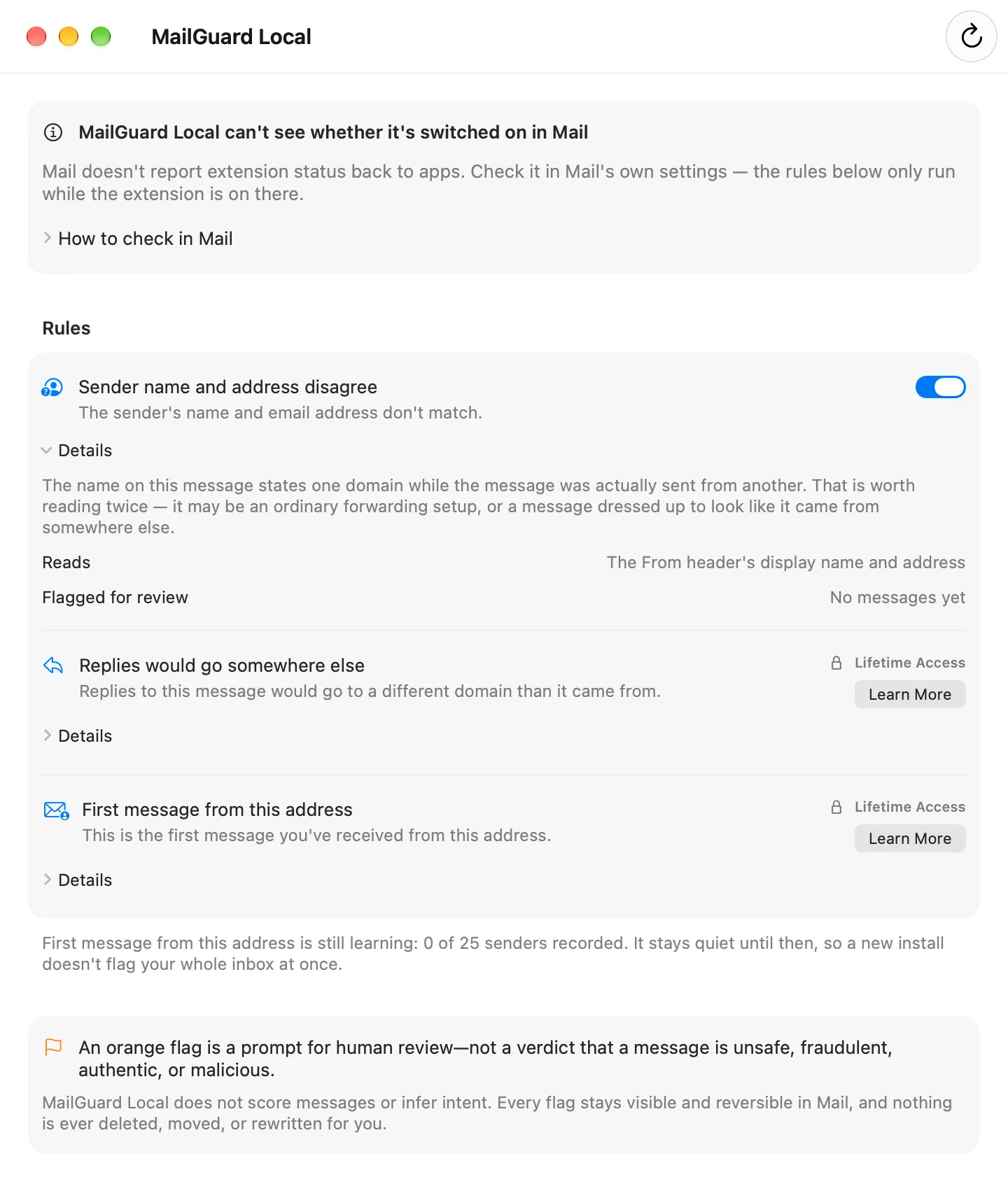
Sender name and address disagree Free
Flags a message when the sender’s name contains an email address or a domain, and the message was sent from a different one. It is one checkable form of display-name spoofing.
Reads The From line: the display name and the address.
- FlaggedThe name
Northstar Billing (northstar.example), sent fromnotice@billing-update.example. - FlaggedA name that is itself an address,
billing@northstar.example, sent fromnotice@billing-update.example. - QuietThe name
Northstar Billing, sent fromnotice@billing-update.example. A name with no address or domain in it makes no claim that can be checked. - QuietThe name
Northstar Billing (northstar.example), sent frombilling@mail.northstar.example. A subdomain of the same domain is the same sender.
- FlaggedThe name
-
Replies would go somewhere else Lifetime Access
Flags a message that asks for replies to go to a different domain than the one it came from. Mailing lists and support desks do this legitimately, so it is a reason to look, not a conclusion.
Reads The From and Reply-To headers.
- FlaggedFrom
anna@northstar.example, with replies sent toaccounts@northstar-payments.example. - QuietNo Reply-To header. A missing header is not a mismatch.
- QuietFrom
anna@northstar.example, with replies sent tohelp@support.northstar.example. Same domain.
- FlaggedFrom
-
First message from this address Lifetime Access · in development
Meant to tell you when an address writes to you for the first time. Most first messages are ordinary; the point is only that you have no history with the sender to draw on.
Reads The From address, kept only as a salted one-way hash.
- QuietUntil it has recorded 25 different senders, so a new install doesn’t flag your whole inbox at once.
- StoredUp to 5,000 hashes, on this Mac only. A hash can’t be read back as an address, and you can clear them all in Settings.
Run on sixty real phishing emails.
- 1
- Sender name and address disagree The free rule. The sender’s name was a streaming service’s domain, and the address was on an unrelated one.
- 10
- Replies would go somewhere else Lifetime Access. The Reply-To pointed at another domain, a free mail account in five of the ten.
- 49
- No rule matched Most used a plain brand or personal name with no address or domain in it. That is a claim these rules do not check.
The app’s rule code was run over the sender lines of 60 messages from Phishing Pot, a public collection of phishing mail caught by honeypots: every 200th message, From and Reply-To only. The first-message rule, still in development, flagged none.
A small sample, run outside Mail, and not a detection rate. It shows where these rules reach and where they stop.
One flag. You decide.
- Mail’s own orange flag
- A match sets the orange flag on the message in Mail. A message that matches several rules still gets one flag.
- Nothing else happens
- Nothing is deleted, moved, sent to Junk or rewritten. Clear the flag yourself, as you would any other.
- The flag carries no label
- Mail’s flag has no room for a reason, so the flag itself doesn’t say which rule matched. The app lists every rule with a count of the messages it has flagged. Apple’s guide says Mail also shows its Extension icon in the header of a message an extension has acted on.
- A prompt, not a verdict
- There is no score. A flag asks you to look twice; it does not say a message is unsafe, fraudulent, authentic or malicious.
- Quiet otherwise
- A message that matches no rule is left exactly as it arrived.
The Mail extension stays offline.
The part that sees your mail is a Mail extension that runs sandboxed without the network permission, so macOS does not let it open a connection. It asks Mail for three headers, From, Reply-To and Subject, and never for the message body or its attachments. The subject is read only by the test rule below.
- Mail says“Email Contents: Can read sensitive information from emails including the message subject and recipients. This applies to all received messages.”
- MailGuard LocalAsks Mail for the From, Reply-To and Subject headers. It does not read the recipients, and it never asks for the body or the attachments.
- Mail says“Email Modifications: Can modify incoming messages. This includes the ability to move messages to other folders, mark messages as read, or flag messages.”
- MailGuard LocalGives Mail one of two answers for each message: set the orange flag, or do nothing.
Mail lists these two permissions when you turn the extension on. The wording is Mail’s, as it showed them for an early build in August 2026.
What it keeps is small: which rules are on, a count for each rule, and the sender hashes. The app you open to change rules is separate; it goes online for the App Store purchase and for feedback, if you choose to send any.
A flag supports your review. It is not guaranteed phishing detection or anti-malware certification, and it doesn’t replace careful review.
What it leaves to you.
- Links, attachments and wording
- It never reads them. A message with a bad link and an ordinary-looking sender matches no rule.
- Whether an address is genuine
- It compares what a message says about itself. A plain name on a look-alike domain, such as
billing@northstar-billing.example, does not trip the free rule. - Spam
- It is not a junk filter and does not sort your inbox.
- Other mail apps and devices
- It works inside Apple Mail on a Mac. The current build needs macOS 14 or later.
Apple’s own list of signs of a fraudulent message begins with a sender that doesn’t match the company it claims to be from, then goes on to links, requests for passwords and unexpected attachments. MailGuard Local works on the first kind only.
Switch it on, then prove it runs.
- Turn it on in MailOpen the app once. Then in Mail choose Mail > Settings, then Extensions, and turn MailGuard Local on. Turning it off there stops it at once. If it isn’t listed, quit and reopen Mail.
- Send yourself a testMail does not tell an app whether its extension is on, and the app says so. So it carries a test rule: switch it on in the app’s Settings and send yourself a message whose subject starts with
[MailGuard Review]. The extension flags it. - Switch the test offThe test rule is off by default and matches nothing a sender wouldn’t have to type on purpose.
Apple’s guide: Use Mail extensions in Mail on Mac.
Free, and Lifetime Access.
- Free
- The first rule, complete, with its explanation. If the app ever cannot read your purchase, this rule keeps running.
- Lifetime Access
- A one-time purchase with no subscription that adds the other rules, including rules added later. It can be shared through Family Sharing.
- Not yet
- MailGuard Local is in pre-release. There is no App Store listing, and nothing can be bought today.
Questions about MailGuard Local? MailGuard Local support · Privacy details