
Coming Soon · Mac
A local gateway. A clearer connection.
MCPcontroler is a Mac app in development that puts one local gateway in front of your MCP servers. An AI client connects to a single address and is shown four tools, not every tool on every server.
POST http://127.0.0.1:8765/mcp
{"jsonrpc":"2.0",
200 four tools
- list_servers
- List MCP servers detected and managed by MCPcontroler.
- search_tools
- Search enabled discovered MCP tools by namespace, server, or description.
- describe_tool
- Describe one downstream MCP tool by stable namespace.toolName key.
- call_tool
- Call one enabled downstream MCP tool by stable namespace.toolName key.
tools/list in pre-release build 26.0.0 on 11 October 2026. The names and descriptions are as returned; the input schemas are left out. The whole answer, schemas included, is 845 bytes.Four tools, however many servers.
A client connected straight to several servers is handed the full tool list of each. Through the gateway it gets these four, and looks up the rest when it needs them.
list_serversThe servers the gateway knows, each with its state and its number of tools.search_toolsThe tools that match a word, by name, server or description. Disabled servers and tools are left out.describe_toolOne tool’s description and input schema, asked for by a key such asfilesystem.read_file.call_toolRuns that one tool on its own server and passes the result back.
A call is refused when the server is disabled or not running, when the tool is switched off, or when the server’s permission preset says no. An unknown key gets a plain answer: “No configured server uses namespace github.”
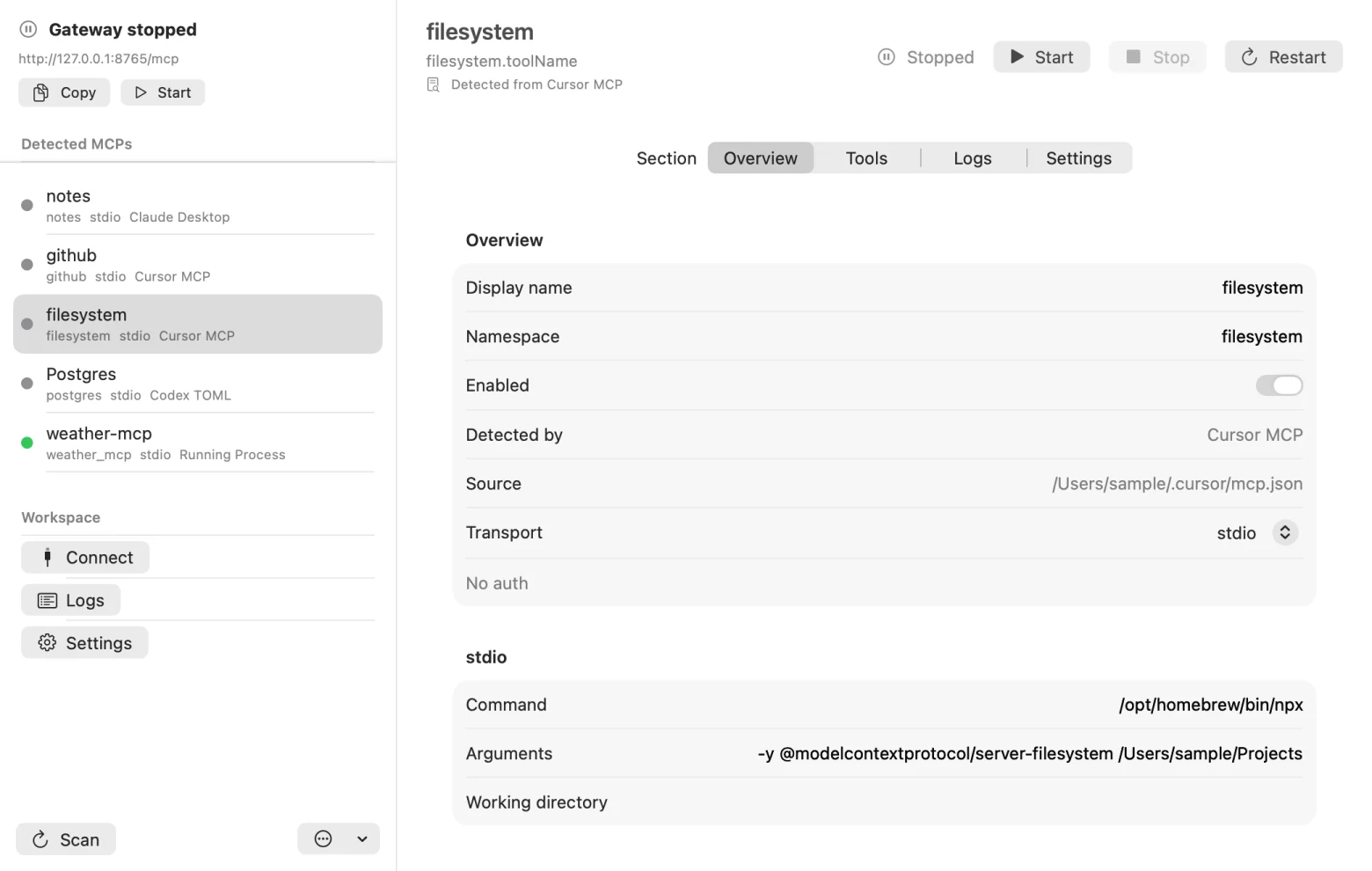
The address is the same for every client. For Claude Desktop, Cursor, Codex and VS Code, the app prepares the entry to paste into the client’s own configuration.
call_tool notes.read_note
{"toolKey":"notes.read_note",
200 routed to the server, answer passed back
"Open with the slow one. Encore: the fast one."
call_tool notes.add_note, with the server set to Read Only
{"code":-32005,
log Allowed tool call. Routed tool call. Denied tool call.
You hold the off switch.
The gateway is for the agent. The menu bar and the window are for whoever owns the Mac.
From the menu bar
- Copy Gateway URL
- Start Gateway, Stop Gateway
- Stop All MCPs
- Scan Local MCPs
- Open Logs
Stop All MCPs asks first, in these words: “MCPcontroler will stop servers it launched and send stop requests to detected external MCP processes.”
For each server
- Start, Stop, Restart
- Enabled, on or off
- Remove From Inventory
Removing a server changes MCPcontroler’s list, not the client’s file: “MCPcontroler will ignore this detection on future scans until you restore removed detections in Settings.”
In the log
- Allowed tool call
- Denied tool call
- Routed tool call
Each line carries the tool’s key. Secrets are cut before a line is written: Authorization: Bearer sk-sample-1234567890 is kept as Authorization: [redacted].
Presets are a brake, not a sandbox.
Each server has a permission preset: Full Access, Read Only, No Filesystem, No Network or Custom. The gateway applies it before it routes a call, by looking for telling words in the tool’s name, description and arguments. It cannot see what a tool really does.
create_issue“Create a new issue in a repository.” Deniedlist_issues“List issues in a repository.” Allowedquery“Run a read-only SQL query.” Denied
Read Only, tried on three sample tools with the build’s own rule. The third is refused for the word “run”. A preset can stop a harmless call and let a harmful one through, so the firm controls are the plain ones: switch the tool off, or the server.
In development
Not working yet.
- Finding your servers by itself
- The app is written to build its list without being told. It reads the MCP entries that Claude Desktop, Claude Code, Cursor, Codex, VS Code and Windsurf already keep, eleven files in all, and looks for running processes with “mcp” in their command line. Build 4 runs in Apple’s App Sandbox, which keeps an app away from other apps’ files and from the process list, so its scan comes back empty. An earlier build without the sandbox read them.
- Talking to standard servers
- The MCP specification separates stdio messages with newlines. Build 4 sends and expects Content-Length headers instead, so a server that follows the specification never answers it: in the test, tool discovery was still waiting after 45 seconds. Over HTTP it cannot read a 202 with no body or an event-stream reply, both of which the specification allows. A sample server using the build’s own framing was listed, searched and called at once.
- Results a model can read
- A tool’s answer comes back inside
structuredContent, and the text block says only “Tool call completed.” A client that hands only the text to its model would not see the answer.
What it leaves out.
- No marketplace. It manages the servers already on your Mac. It does not list or install new ones.
- No remote access. The gateway listens on 127.0.0.1 only, and there is no LAN mode in this version.
- No OAuth sign-in. A remote server that needs one cannot be signed in to from the app.
- No account or relay. Nothing is routed through a Crafter Apps server.
Your Mac, your connections.
The server list, the settings and the log are stored on your Mac, and secrets you add are kept as Keychain items, not in that store. MCPcontroler doesn’t send MCP traffic or tool payloads to Crafter Apps. The one thing it can send is feedback you choose to write in the app. The tools, servers and services you connect may process data under their own policies, and you stay responsible for what you connect and the permissions you grant.
Not yet available to download. The current build needs macOS 26. There is no public offer, price or promised launch date, and what is described here may change before release.
Questions about MCPcontroler? MCPcontroler support · Privacy details