
Coming Soon · Mac
From the app window to its preview.
PreviewCraft records one window of your Mac app, lets you trim the take, and exports a 1920 × 1080 preview only when it meets Apple’s rules for length, frame size, frame rate, codec and file size. It is in pre-release.
Capture. Trim. Check. Export.
- Capture One window, chosen in the macOS window picker and recorded with its cursor after a three-second countdown. Nothing else on screen is captured.
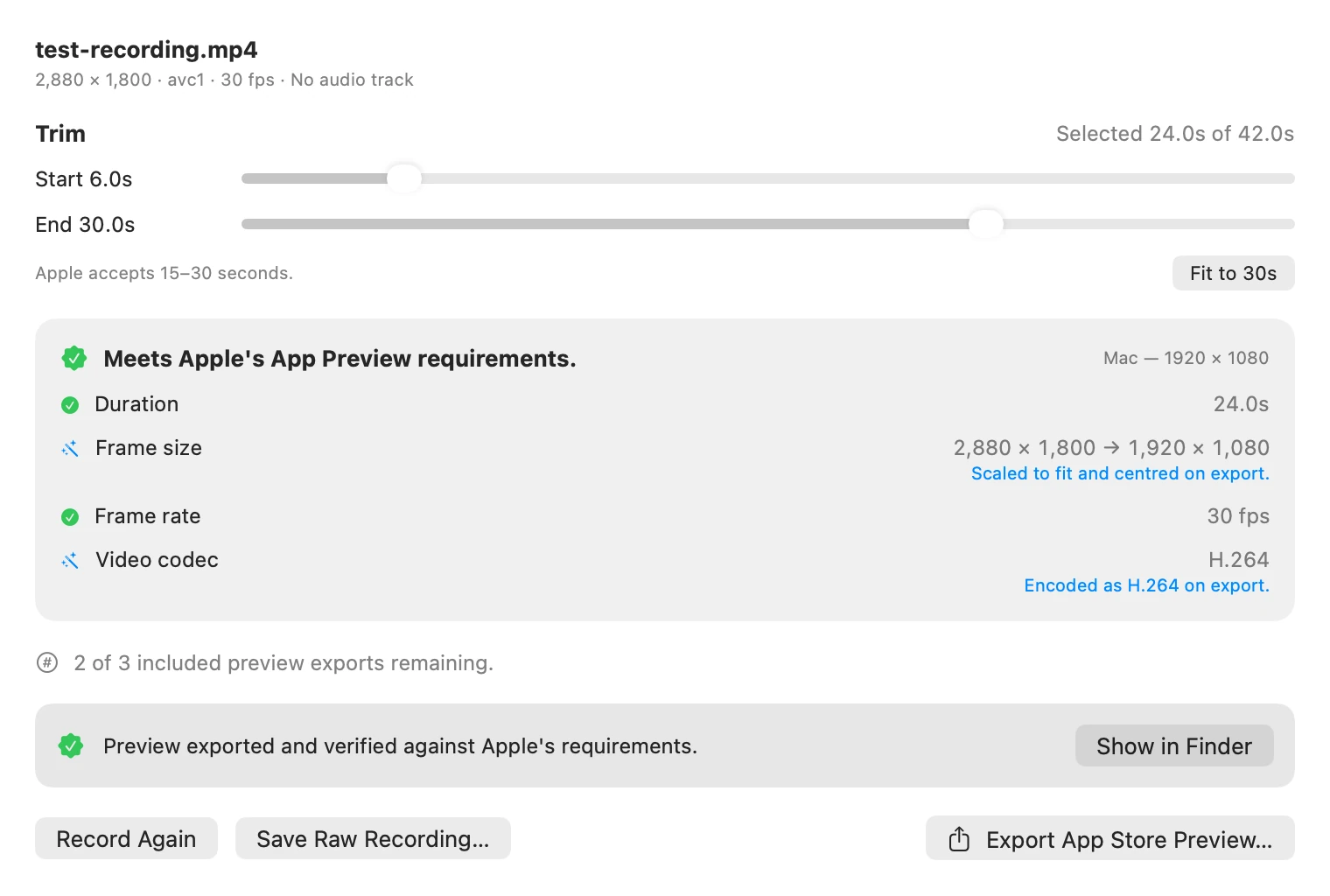
- Trim Keep the 15 to 30 seconds that matter. A longer take opens already cut to its first 30.
- Check Duration, frame size, frame rate and codec are checked as you trim. Export stays off until they fit.
- Export An H.264 MP4 at 1920 × 1080, saved where you choose. The file is checked again once written, file size included, and discarded if it fails. PreviewCraft never uploads it.
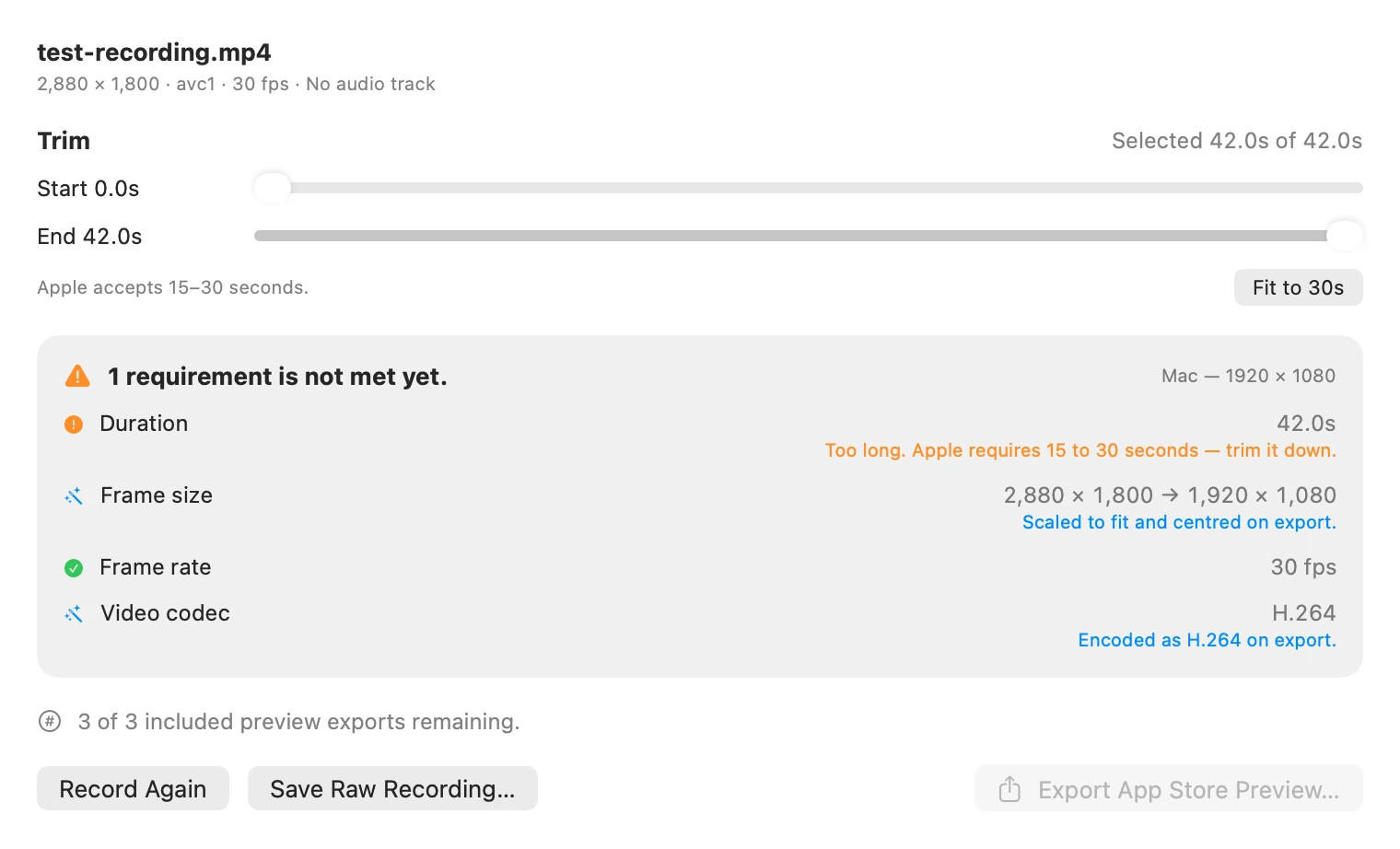
Both images use the same test recording: 42 seconds at 2880 × 1800, 30 frames per second, no audio. The export was run with the app’s own exporter on 11 October 2026. A 24-second cut became a 28.9 MB file in 3.1 seconds on an Apple M5 Mac, and ffprobe read it back as 1920 × 1080, H.264 High 4.0, at a constant 30 frames per second. The app may change before release.
Apple’s rules, and what the app does.
| Requirement | Apple, for a Mac preview | PreviewCraft |
|---|---|---|
| Length | 15 to 30 seconds | Opens a longer take cut to 30 seconds and blocks export while the trim is outside the range. |
| Frame size | 1920 × 1080, landscape | Scales the window to fit and centres it. A window that is not 16:9 gets black bars: 2880 × 1800 becomes 1728 × 1080 with 96 pixels on each side. |
| Frame rate | Up to 30 frames per second | Records at up to 30 and writes a constant 30. |
| Video | H.264 up to High profile, level 4.0, at 10 to 12 Mbps, or ProRes 422 HQ | Encodes H.264, High profile, level 4.0, aiming at 11 Mbps. |
| Audio | Stereo AAC at 256 kbps, 44.1 or 48 kHz | Not checked in this build. See “Not in this build” below. |
| File size | Up to 500 MB | Checked on the exported file. At 11 Mbps, 30 seconds of video is about 41 MB. |
Apple’s column is from its app preview specifications as published on 11 October 2026. Apple may change them, and the app checks against the rules built into the installed version, so read the current page before you submit.
Before the first export.
- Status
- Still in development, with no public download or promised release date.
- Mac
- macOS 15 or later. One preset so far: Mac previews at 1920 × 1080. It does not make iPhone, iPad, Apple TV or visionOS previews.
- Free
- Recording, trimming, saving the raw recording, and three checked exports.
- Lifetime Access
- Unlimited checked exports, as a one-time purchase with no subscription. Files you have already exported are never restricted. Not available yet.
- Your recordings
- Recordings, trims, checks and exports are processed and stored on your Mac. PreviewCraft doesn’t upload your recordings and doesn’t connect to App Store Connect.
- Not in this build
- Audio you can rely on. It is not one of the checks, a take recorded without app audio exports with no audio track, and exporting a take that has one does not finish yet. Also not here: opening a video made elsewhere, and any preset but Mac.
Questions about PreviewCraft? PreviewCraft support · Privacy details