
Find what Xcode left behind.
DevCleanr is a Mac app that scans Xcode’s Derived Data, simulators and caches, rates every item Safe, Review, Needs Care or Not cleaned, and moves only what you choose to the Trash.

Free download · Lifetime Access is a one-time purchase · No subscription
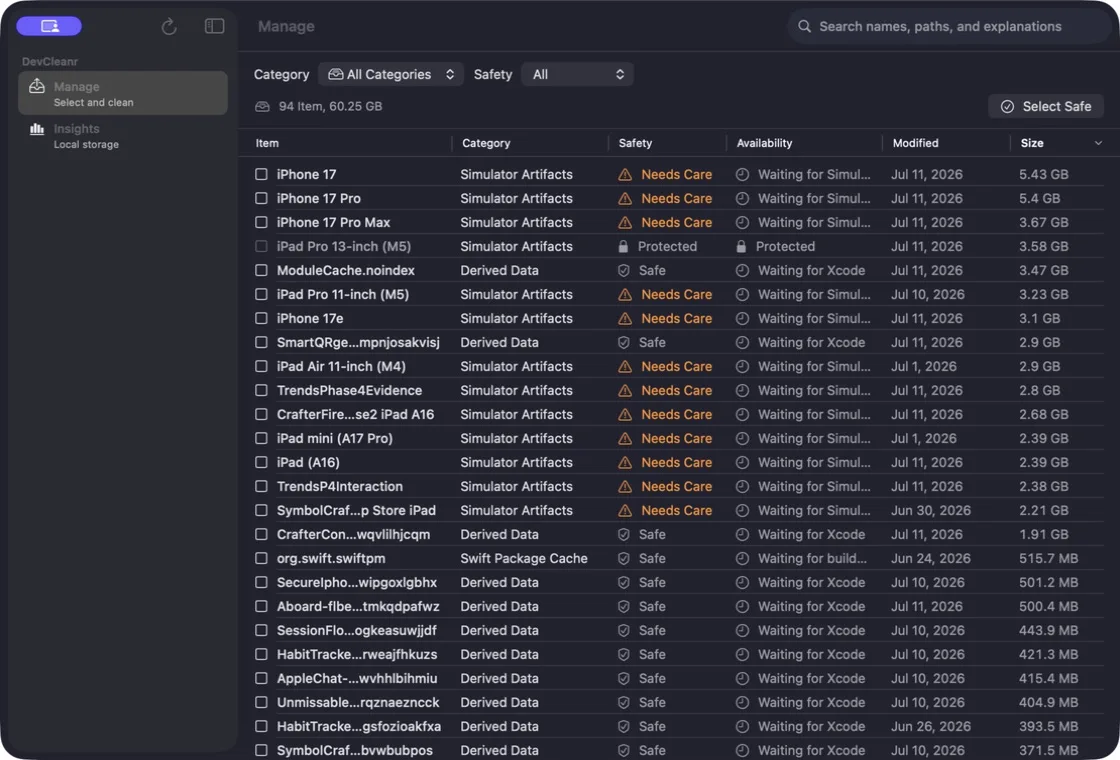
 DevCleanr
60.25 GB found on one developer’s Mac.
- Simulator Artifacts 42.41 GB
- Derived Data 17.11 GB
- Packages, Archives, logs, caches under 1 GB
One real scan, 94 items. The page draws the totals the app reported.
In the app, My Mac Stats shows the same breakdown for your Mac: each category with its size, its item count and how many items are Safe or Review.
Every item gets a safety level.
Each result shows its path, its size and a plain-English explanation. Xcode items read Xcode open while Xcode runs, and simulator files wait until you close Simulator or Device Hub.
- Safe
- Build products and caches the tool makes again. Select Safe picks only these.
- Review
- Archives, device symbols, logs and simulators you may still need. Look before you clean.
- Needs Care
- Simulators that hold app data or ran in the last two weeks.
- Not cleaned
- Source folders, symbolic links, running simulators and protected paths stay put.
Where DevCleanr looks.
Ten developer storage categories in your home folder, each with a default safety level. It also follows a custom Derived Data location set in Xcode.
Derived Data
Safe
~/Library/Developer/ Xcode/ DerivedData Xcode Caches
Safe
~/Library/Caches/ com.apple.dt.Xcode Xcode/UserData/ Previews Simulator Artifacts
Caches Safe · Devices Review
~/Library/Developer/ CoreSimulator User Caches
Safe
~/Library/Caches/ com.apple.CoreSimulator Swift Package Cache
Cache Safe · ~/.swiftpm Review
~/Library/Caches/ org.swift.swiftpm ~/.swiftpmCocoaPods Cache
Cache Safe · ~/.cocoapods Review
~/Library/Caches/ CocoaPods ~/.cocoapodsArchives
Review
~/Library/Developer/ Xcode/ Archives Device Support
Review
~/Library/Developer/ Xcode/ iOS DeviceSupport Homebrew Cache
Review
~/Library/Caches/ Homebrew User Logs
Review
~/Library/Logs/ com.apple.dt.Xcode Logs/CoreSimulator
Folder-by-folder guide: what each holds, and what removing it costs
Nothing is deleted. It moves to the Trash.
- You choose
- Select Safe picks only the items marked Safe. Move Selected to Trash asks you to confirm, checks every path again, then moves only what you selected.
- You can undo it
- Items go to the Trash, never straight to deletion, so you can restore them until you empty it.
- Never touched
- Project source folders, symbolic links, running simulators and anything outside the folders above. Personal files are not scanned by default. DevCleanr runs in the App Sandbox, asks only for the developer folders it reads, and never asks for Full Disk Access.
- While Xcode is open
- Xcode files wait while Xcode, Simulator, Device Hub or build tools run. With Lifetime Access, DevCleanr can clean Safe items after Xcode quits, and it rescans first.
Made for the build loop.
Previews, test runs and coding agents rebuild all day, so these folders grow between scans. DevCleanr stays in the menu bar and keeps watch on this Mac only.
In the menu bar Free
- How much was found, how much is ready to clean, and the largest categories.
- Scan Now, select what can move, and move it to the Trash after a confirmation.
- Xcode open shows while Xcode runs, so nothing is attempted too early.
With Lifetime Access One-time purchase
- Local scan history: which category grew since the last scan, and a note when fast builder activity shows up.
- Safe cleanup after Xcode quits, a weekly scan reminder, and an alert when developer storage passes a threshold you set.
- Custom cache paths, and simulator details: name, runtime, state and whether app data is inside.
Scan history stays on your Mac. There is no account, and nothing is uploaded.
At a glance
- Devices
- Mac
- Requires
- macOS 26.5 or later
- Price
- Free download · Lifetime Access $9.99 · One-time purchase · No subscriptionUS App Store price, checked October 10, 2026 · Family Sharing included
- Free version
- Scan, full results, and cleaning Safe items from the menu bar
- Languages
- 55
- Your data
- Reads file names and sizes on this Mac. Nothing is uploaded, and there is no account.
- Version
- 26.0.0 · updated
Works with
- Menu bar
Questions
Is it safe to delete Derived Data?
Yes. DevCleanr marks Derived Data Safe: it holds build intermediates and indexes that Xcode rebuilds when a project opens again. Your next build, preview or index may take longer.
Does DevCleanr remove simulator runtimes?
No. It looks at simulator devices and caches in your home folder. Simulator device folders are marked Review because they can contain app data, and running simulators are never cleaned. Remove runtimes in Xcode under Settings → Components.
Can I get something back after cleaning?
Yes. DevCleanr moves items to the Trash, so you can restore them from the Trash until you empty it.
Do I have to quit Xcode?
Only for Xcode files. DevCleanr waits while Xcode, Simulator, Device Hub or build tools run. With Lifetime Access it can clean Safe items once Xcode quits.
Why is my Mac’s System Data so large?
Developer storage is often the reason. Xcode’s Derived Data, simulators, caches and archives live in your home folder’s Library, and macOS counts them as System Data in Storage settings rather than showing them as apps or documents. DevCleanr lists them by category with their sizes.
Does DevCleanr need Full Disk Access or root access?
No. DevCleanr runs in the App Sandbox and never asks for Full Disk Access or root access. When a protected Xcode or CoreSimulator folder is out of reach, macOS asks you to grant that one folder, and the scan updates by itself.
Can I delete old Xcode archives and Device Support files?
DevCleanr marks both Review, so they are never cleaned automatically: you choose them in the Manage window. An archive is your distribution history and holds the symbols that read crash reports from that build, so keep the archives of versions people still run. Device Support files are symbols for each OS version of a device you connected, and Xcode downloads them again when a matching device is connected.
What is free, and what does Lifetime Access add?
Scanning, the full results and cleaning are free: move what you select to the Trash from the Manage window, or clean Safe items from the menu bar. Lifetime Access is a one-time purchase that adds cleanup when Xcode closes, a weekly scan reminder, storage threshold alerts, custom cache paths, history insights and simulator intelligence. Family Sharing is included.
How do I find DevCleanr on the Mac App Store?
Search for DevCleanr, spelled without an e before the r, or use the download link on this page. It is made by Crafter Apps, and inside the app the window title still shows its original name, Xcode Care.
Scan first. Decide after.
The scan and its full results are free. See what Xcode left on your Mac before you move anything.
Free download · Lifetime Access is a one-time purchase · No subscription
Pairs well with

The other Mac tool for your Xcode projects: on-device translation of your app strings.

Prepares the app icon set for the same Xcode project, with no upload.

Availability
Scanning, the full results and cleaning are free, from the Manage window or the menu bar. Lifetime Access adds cleanup when Xcode closes, a weekly scan reminder, storage threshold alerts, custom cache paths, history insights and simulator intelligence.
- Devices
- Mac
- Download
- Free to download
- Purchase options
- Lifetime Access · One-time purchase · No subscription
Prices vary by country; the App Store shows your local price.
DevCleanr support and purchase help
Designed and built by Daniel, an independent Apple developer. Every release is listed in the changelog.