Draft your app’s translations on your Mac.
AutoTranslate is a Mac app for developers that drafts translations of English app strings in up to 18 languages, with no API key.

Free for 10 strings and 2 languages per run · Lifetime Access is a one-time purchase · No subscription, no tokens
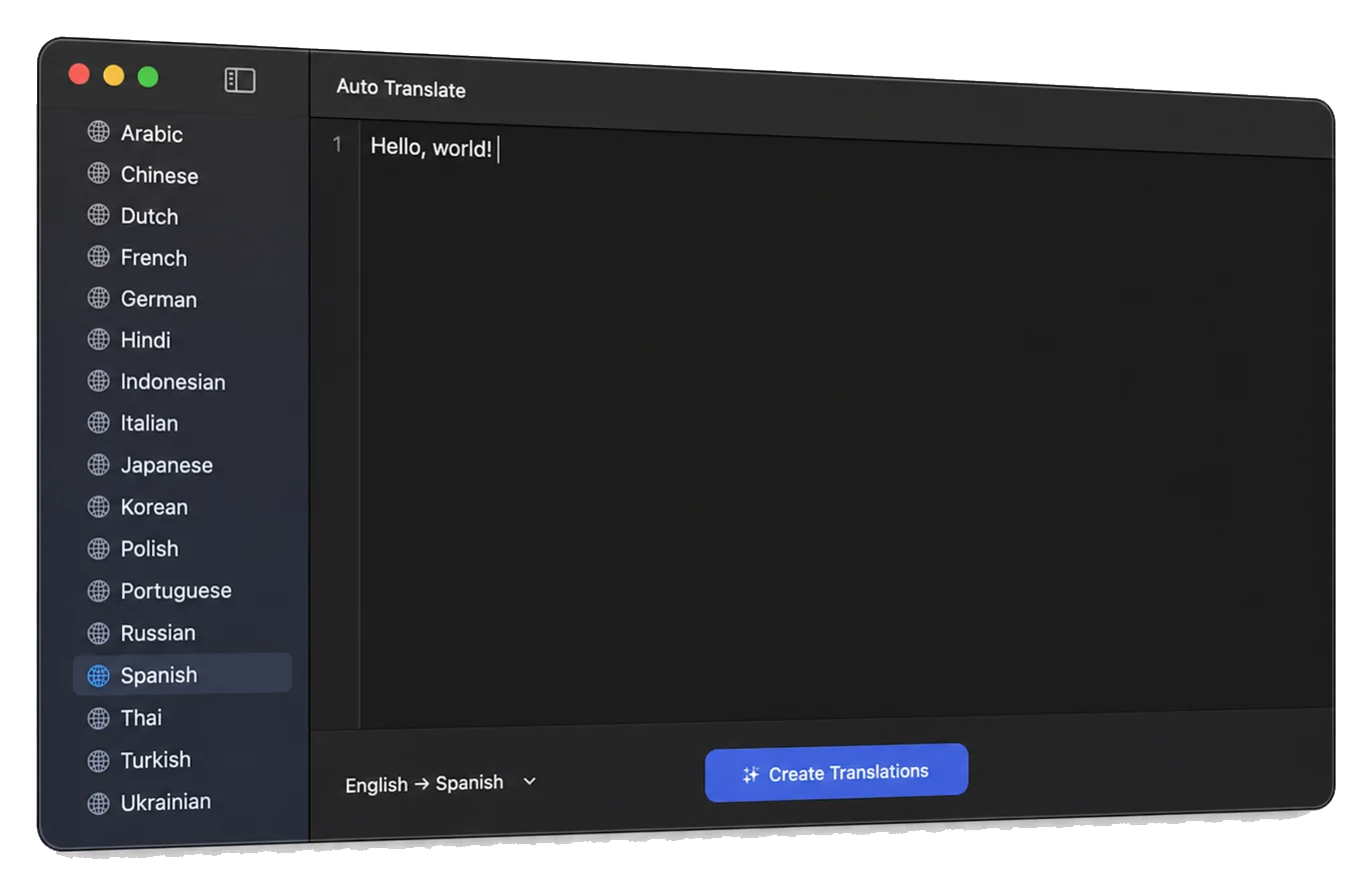
One line, eighteen drafts.
Choose Create Translations and Apple’s Translation framework drafts every line on your Mac, in each language you ticked.
 AutoTranslateEnglish → 18 drafts
en Create your first project
- ar-AE أنشئ مشروعك الأول
- zh 创建你的第一个项目
- nl Maak je eerste project
- fr Créez votre premier projet
- de Erstellen Sie Ihr erstes Projekt
- hi अपना पहला प्रोजेक्ट बनाएं
- id Buat proyek pertama Anda
- it Crea il tuo primo progetto
- ja 最初のプロジェクトを作成する
- ko 첫 번째 프로젝트를 만드세요
- pl Stwórz swój pierwszy projekt
- pt Crie seu primeiro projeto
- ru Создайте свой первый проект
- es Crea tu primer proyecto
- th สร้างโปรเจกต์แรกของคุณ
- tr İlk projenizi oluşturun
- uk Створити свій перший проект
- vi Tạo dự án đầu tiên của bạn
Line two of the window above, drafted by Apple’s Translation framework on macOS 27 in October 2026 and left unedited. Each label is the key that draft gets in the saved file. Spanish is the language ticked in the window.
The file you get.
Export saves the run as a new Localizable.json wherever you choose. This is the file for the window above: seven strings, Spanish ticked.
- Structure
- String Catalog JSON:
sourceLanguageis"en",versionis"1.0", and each English string is a key understrings. - Each draft
- A
stringUnitunderlocalizations, with itsvalueand the state"translated". - In Xcode
- Renamed to
Localizable.xcstrings, this file compiled with Xcode 27’sxcstringstool. It is a new catalog; merging it into an existing one is up to you. - Shortcuts
- Translate with ⌘T. Export with ⌘S once a run has finished.
{
  "sourceLanguage" : "en",
  "strings" : {
    "Create your first project" : {
      "localizations" : {
        "es" : {
          "stringUnit" : {
            "state" : "translated",
            "value" : "Crea tu primer proyecto"
          }
        }
      }
    },
    … 6 more strings
  },
  "version" : "1.0"
}
Drafts, not finished translations.
Each line is translated on its own, with no hint that it sits on a button. In that file, two of the seven Spanish drafts read a verb as a noun. Have someone fluent review every draft before you ship: the file marks each one "translated" either way.
-
en Export release notes
es Notas de lanzamiento de la exportación
Reads as “release notes of the export”, a label instead of an action.
-
en Sync changes with iCloud
es Cambios de sincronización con iCloud
Reads as “synchronization changes with iCloud”, a label instead of an action.
What it doesn’t do
- Open or update an existing
.xcstringscatalog. - Handle plurals or device variations.
- Translate from a language other than English.
At a glance
- Devices
- Mac
- Requires
- macOS 15 or later
- Price
- Free download · Lifetime Access $14.99 · One-time purchase · No subscriptionUS App Store price, checked October 10, 2026
- Free version
- Up to 10 strings and 2 languages per run
- Languages
- 49
- Your data
- Strings are translated on your Mac by Apple's Translation framework and never sent to Crafter Apps. No account.
- Version
- 26.0.0 · updated
Questions
Can AutoTranslate open my existing .xcstrings file?
Not in this version. Paste the English strings you want translated, one per line, and AutoTranslate saves a new Localizable.json file in String Catalog JSON structure.
Xcode 27 can translate String Catalogs with a coding agent. Why use AutoTranslate?
Different jobs. Apple’s WWDC 2026 session shows a coding agent in Xcode 27 adding a language to a project, filling its String Catalogs in batches with the model you choose, and checking the translated interface for clipped text; it also notes that a model’s quality varies by language. AutoTranslate drafts pasted English lines with Apple’s Translation framework on your Mac, with no agent, model account or key, and saves a new Localizable.json for you to review. For a quick draft of a few strings that stays on your Mac, use AutoTranslate; for a whole project inside Xcode, use the agent.
Which languages can it translate into?
From English into the 18 in the app’s sidebar: Arabic, Chinese, Dutch, French, German, Hindi, Indonesian, Italian, Japanese, Korean, Polish, Portuguese, Russian, Spanish, Thai, Turkish, Ukrainian and Vietnamese, where Apple’s Translation framework supports them on your Mac. The first time you use a language, macOS may need to download it. The Languages figure under At a glance is the app’s own interface, not the translation targets.
Are my strings sent anywhere?
Not to Crafter Apps. Translation runs on your Mac through Apple’s Translation framework, and there is no account. Apple may collect usage information about the framework itself, as the privacy policy explains.
What is free, and what does Lifetime Access add?
Each run can translate up to 10 strings into 2 languages for free. Lifetime Access is a one-time purchase that removes both limits, with no subscription.
I got AutoTranslate before Lifetime Access existed. Do I have to buy it?
No. If your Apple Account got a version of AutoTranslate earlier than 25.3.0, the full app unlocks automatically. If it doesn’t, use Restore Purchases in the app’s purchase sheet.
Try it on ten of your own strings.
Free to download, with no account and no API key. Lifetime Access removes the limits with one purchase: no subscription and no tokens to buy.
en Create your first project
es Crea tu primer proyecto
Pairs well with

The other Mac tool for your Xcode projects: it finds the build data and simulator files Xcode leaves behind.

Prepares the app icon set for the same Xcode project on iPhone or iPad, with no upload.


Availability
- Devices
- Mac
- Download
- Free to download
- Purchase options
- Lifetime Access · One-time purchase · No subscription
Prices vary by country; the App Store shows your local price.
AutoTranslate support and purchase help
Designed and built by Daniel, an independent Apple developer. Every release is listed in the changelog.