
Remember the birthday. Have time for the gift.
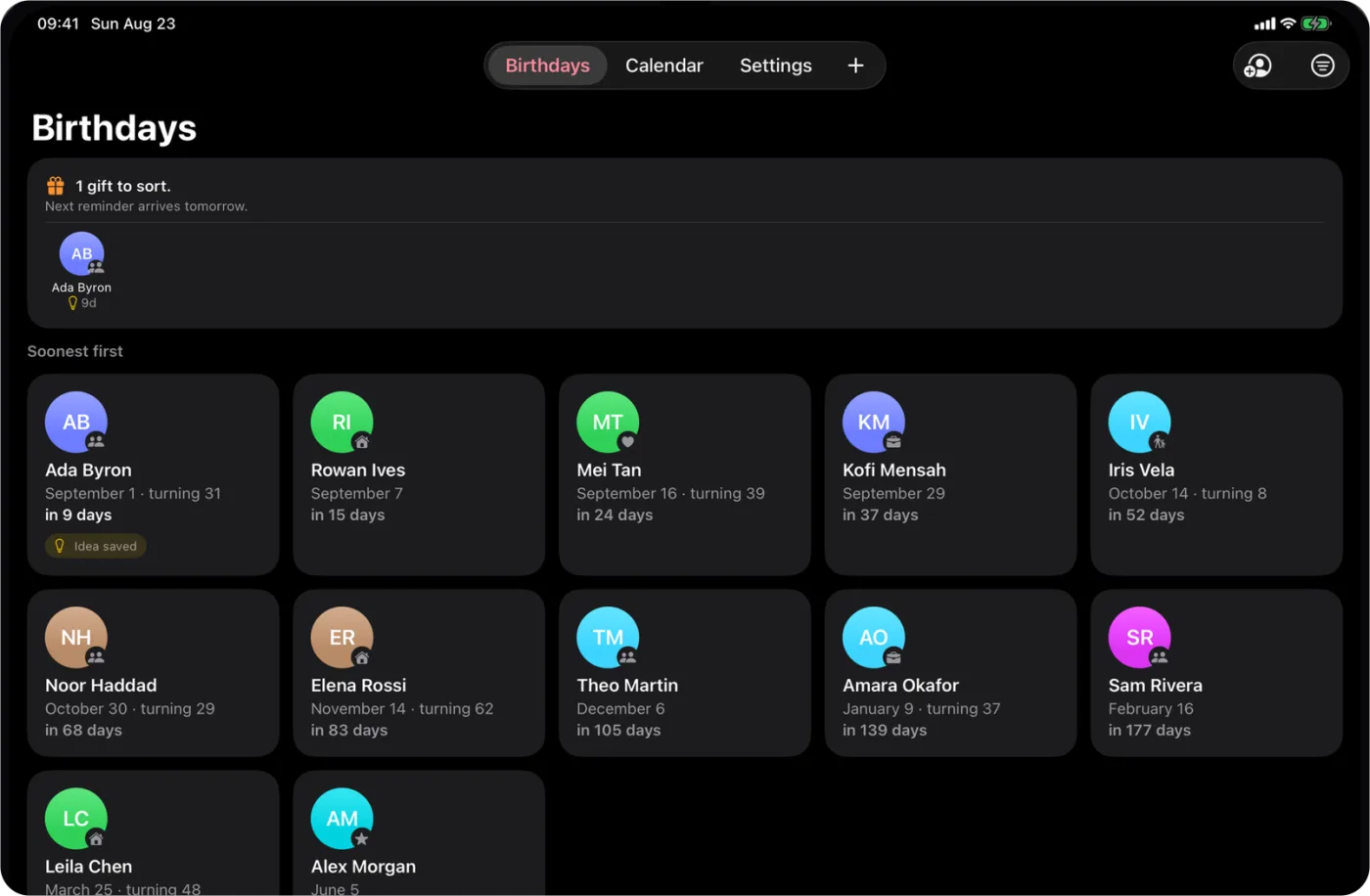
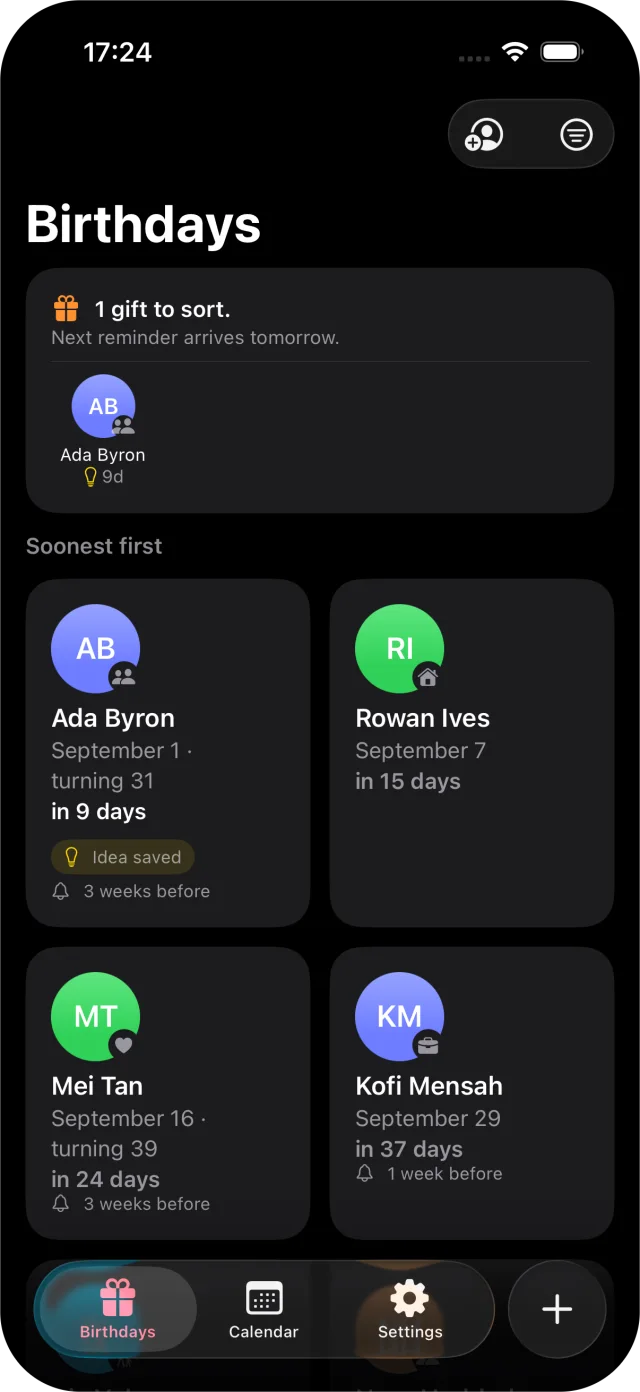
Giftahead is a birthday countdown for iPhone and iPad. It keeps upcoming birthdays in view, reminds you up to three weeks ahead, and tracks each gift from idea to given.

iPhone · iPad · Free for up to five people
At a glance
- Devices
- iPhone · iPad
- Requires
- iOS 26 and iPadOS 26 or later
- Price
- Free download · Lifetime Access $12.99 · One-time purchase · No subscriptionUS App Store price, checked October 11, 2026 · Family Sharing included
- Free version
- Up to five people, with Contacts import, every widget, Siri and Spotlight
- Languages
- 44
- Your data
- Your list stays on the device where you add it. No account and no iCloud sync; drafts are written on the device.
- Version
- 26.0.1 · updated
Works with
- Siri & Shortcuts
- Home Screen widgets
- Lock Screen widgets
- Spotlight
- Apple Intelligence on device
Widgets, Siri and Spotlight are free. Apple Intelligence drafts, and birthday alarms that sound through Silent mode and Focus, need Lifetime Access.
Ask Siri: What birthdays are coming up in Giftahead
· Add a birthday to Giftahead
· I bought a gift in Giftahead
A heads-up with runway.
Choose when the reminder lands: on the day, or 3 days, 1 week, 2 weeks or 3 weeks ahead, at 9:00 or the hour you set, and it comes back every year without re-adding. Then follow each gift from nothing yet to idea saved, bought and given. Add a birth year and Giftahead shows the age they’re turning; leave it out and it never guesses.

The next birthday, without opening the app.
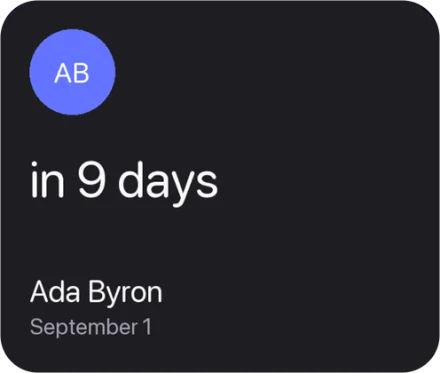
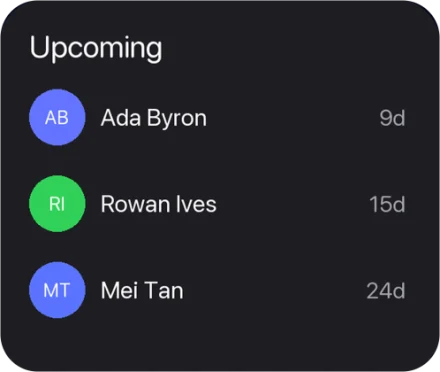
Home Screen widgets follow one person or whoever is coming up soonest, show which gifts still need buying, and mark the month ahead. A Lock Screen widget keeps the next countdown in view.
Loud enough on the day.
Reminders are notifications, so they follow Silent mode and Focus. With Lifetime Access, add a birthday alarm for someone: a full-screen alert on the day, at the time you choose for that person, that sounds even on silent or in a Focus. Alarms stay off until you add one.
A first draft, written on your device.
With Lifetime Access, Apple Intelligence drafts a birthday message or sketches gift ideas from a person’s name, relationship and your note. Stop it whenever you like, and tap an idea to add it to the note. You get kinds of gifts, never products, shops or links.
Needs a device with Apple Intelligence turned on. If it doesn’t write your language yet, the draft is in English and Giftahead says so.
Your list stays yours.
No account, no analytics, no cloud list. Birthdays stay on your device, and reminders are local notifications scheduled there. Import from Contacts reads names and birthdays only and never changes your contacts. Optional feedback and support messages are covered in the Privacy Policy.
Questions
Can Giftahead import birthdays from Contacts?
Yes. It asks for Contacts access only when you choose Import, reads names and birthdays, and never changes your contacts. Import copies them once: a later change in Contacts doesn’t flow in, and importing again warns when a name and date are already on your list, without merging anything behind your back. People you import count toward the five free people.
Calendar already shows birthdays. What does Giftahead add?
The Calendar app shows birthdays from Contacts and alerts you with one Default Alert Times setting for all of them. Giftahead gives each person a countdown and a reminder up to three weeks ahead, tracks the gift from idea to given, puts the next birthday in a widget, and can add an alarm that sounds through Silent mode. It tracks birthdays only, not anniversaries, and Add to Calendar still puts a birthday into Calendar when you want it there.
What is free, and what does Lifetime Access add?
Free: up to five people with one shared reminder lead time, every widget, Siri, Spotlight and gift tracking. Lifetime Access is a one-time purchase with no subscription, and Family Sharing is included. It adds unlimited people, a lead time for each person, birthday alarms, message drafts and gift ideas on devices with Apple Intelligence, and CSV and PDF export.
Can I add someone whose birthday I don’t know yet?
Yes. Turn off I know the date and they stay on the list without a countdown or a reminder until you fill the date in.
What about a 29 February birthday?
Giftahead keeps it as 29 February. In other years the countdown, the reminder and any alarm land on 28 February, so the birthday is never skipped for three years at a time.
Can I put a birthday in the Calendar app too?
Yes, for free. Add to Calendar on a person’s page opens the system event sheet with the birthday and its reminder filled in, and you choose the calendar. Giftahead only adds that one event and never reads your calendars.
I track a lot of people. Will every reminder be scheduled?
iOS lets an app keep 64 pending notifications, so Giftahead schedules the nearest birthdays first and adds the rest as earlier ones pass. A person beyond that limit says so on their page, with the date their reminder is due.
Will I hear a reminder when my iPhone is on silent?
Reminders are notifications, so they follow Silent mode and Focus. With Lifetime Access you can add a birthday alarm for a person: a full-screen alert on the day, at the time you choose, that sounds even in Silent mode or a Focus.
Are drafts written in the cloud?
No. Apple Intelligence writes message drafts and gift ideas on your device, which needs Apple Intelligence to be available and turned on. If it doesn’t support your language, the draft is written in English and Giftahead tells you.
Does my list sync between iPhone and iPad?
No. There is no iCloud sync; birthdays stay on the device where you add them. With Lifetime Access you can export a CSV or PDF copy of your list: name, date, relationship, note, gift status and reminder for each person.
Pairs well with
Scan the gift receipt into a private PDF, ready for returns and warranties.
Availability
Free for up to five people with a shared reminder lead time. Lifetime Access adds unlimited people, a lead time for each person, birthday alarms, message drafts and gift ideas on devices with Apple Intelligence, and CSV and PDF export.
- Devices
- iPhone · iPad
- Download
- Free to download
- Purchase options
- Lifetime Access · One-time purchase · No subscription
Prices vary by country; the App Store shows your local price.
Giftahead support and purchase help
Designed and built by Daniel, an independent Apple developer. Every release is listed in the changelog.